예전에 회사에서 하는 아나바다에서 256GB짜리 SATA SSD를 하나 만원주고 샀는데, 애초에 계획은 플레이스테이션에 넣어서 게임 로딩을 조금이라도 빠르게 해보려는 것이었지만 요즘 게임들 크기를 생각하면 몇개 들어가지도 않을것 같아서 포기하고 책상 서랍에 처박아 두었더랬다.
반면 개발용으로 회사에서 사용해 오던 워크스테이션에는 Ubuntu가 설치되어 있었는데, 이 녀석의 데이터를 최대한 보존 하면서도 내가 좋아하는 Arch Linux로 옮겨가려면 어떻게 할까 고민하다가, 기존에 쓰던 1TB Ubuntu에 추가로 256GB SSD를 설치해서 Ubuntu에서 사용하던 home directory를 그대로 Arch Linux에서 사용하겠다는 원대한 계획을 새웠다.
Arch Linux의 설치 자체는 문서가 워낙 잘 되어 있어서 그다지 어렵지는 않다. 이 번에도 큰 문제 없이 잘 설치가 되었다.
두개의 GRUB vs 하나의 GRUB
하나의 시스템에 두개의 하드를 붙여서 서로 다른 두개의 배포판을 돌리려고 하면 GRUB boot loader는 어떻게 설치해야 할까? Kernel이야 각각의 /boot 안에 넣어둔다고 해도 boot loader는 따로 두어야 하나 아니면 하나만 두어야 하나?
각각 둔다면 BIOS에서 부팅 우선순위를 정해서 어느 GRUB을 가져올지 정해서 부팅해야 한다. 따라서 원격으로 배포판을 변경하는 것이 불가능하다. 반면 한 곳에 둔다면 조금 귀찮기는 하지만 설정파일의 default 값을 설정하는 것으로 배포판을 변경하는게 불가능하지는 않다.
따라서 Ubuntu의 GRUB을 그대로 사용하고 Arch Linux를 여기에 등록하기로 했다.
Arch Linux 부팅 이미지 등록을위해 Ubuntu로 부팅해서 패키지를 깔고 probing을 수행한다.
sudo apt install os-prober
GRUB 환경설정의 GRUB_DISABLE_OS_PROBER=false는 주석처리 되어 있지만, 확실히 하려고 주석을 삭제해 주었다.
sudo emacs /etc/default/grub

# 이 부분 uncomment
GRUB_DISABLE_OS_PROBER=false
이제, 설치된 Arch linux를 마운트하고 boot image를 probing 실행 후 update-grub을 실행한다.
sudo mount /dev/sdb1 /mnt
sudo update-grub
이렇게 하면 마운트된 디스크에서 Arch Linux 부팅이미지가 검색되어 Ubuntu의 /boot/grub/grub.cfg가 update된다.
Default booting 변경하기
이제 부팅할 때마다 Arch Linux가 기본으로 선택되도록 GRUB을 변경한다.
/boot/grub/grub.cfg에서 menuentry 와 submenu 구문을 검색해 본다.
❯❯sudo grep -E "^menuentry|^submenu" grub.cfg

menuentry 'Ubuntu' --class ubuntu --class gnu-linux --class gnu --class os
submenu 'Advanced options for Ubuntu' $menuentry_id_opt
menuentry "Memory test (memtest86+x64.bin)" --class memtest
menuentry 'Memory test (memtest86+x64.bin, serial console)' --class memtest
menuentry 'Arch Linux (on /dev/sdb1)' --class arch --class gnu-linux --class gnu
submenu 'Advanced options for Arch Linux (on /dev/sdb1)' $menuentry_id_option
순서상 Arch linux는 다섯번 째 위치에 있으므로 0부터 시작해서 4번이 Arch를 시작하는 entry가 된다.
/etc/default/grub의 GRUB_DEFAULT를 4로 변경하고 update-grub을 수행한 다음 리붓한다.
GRUB_DEFAULT=4
부팅하기 전에 update-grub에 의해 default entry가 제대로 설정되었는지 “set default=” 구문을 검색해 보면 확인할 수 있다.
❯❯❯ sudo grep "set default=" /boot/grub/grub.cfg
   set default="${next_entry}"
   set default="4"
Home directory mount
새롭게 home directory를 생성하는 것보다 기존에 Ubuntu에서 사용하던 것을 그대로 가져오면 local 설정들을 별 힘들이지 않고 재 사용할 수 있다.
먼저 Ubuntu partition을 /mnt/ubuntu에 마운트 해둔다.
그리고 나서 genfstab -U /mnt/ubuntu 명령어로 partition의 UUID를 생성하고 /etc/fstab에 등록해 준다.
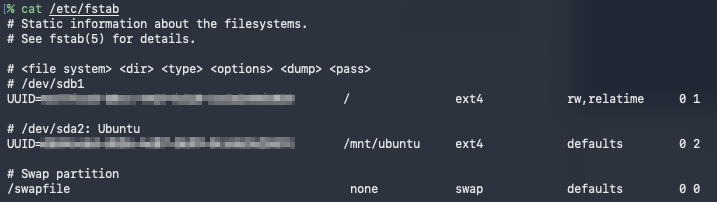
마지막으로 생성된 home directory를 삭제하고 /mnt/ubunut/home안에 있는 홈디렉토리로 symbolic link를 생성하고 필요에 다라 소유권을 설정해 준다.

업데이트 문제는 없나?
이 상의 설정은 Ubuntu와 Arch Linux 각각이 /boot 디렉토리를 가지고 있고, grub은 Ubuntu의 /boot/grub 안에 있는 것을 사용하는 형태이다. 따라서 각 distro의 커널들을 자신의 /boot 디렉토리에 위치하기 때문에 커널 버전 업데이트는 문제가 되지 않는다. 다만, grub 자체의 버전이나 설정을 변경하고 싶다면 반드시 Ubuntu로 부팅해야만 한다.